'2013/04'에 해당되는 글 10건
- 2013.04.22 1d data interpolation
- 2013.04.21 블루스크린 확인
- 2013.04.11 Deployment error... ㅜ ㅜ
- 2013.04.09 strcat example
- 2013.04.06 CONNECT TWO .FIG IN GUI
- 2013.04.03 Button에 Running 표시
- 2013.04.03 GUI Compile
- 2013.04.03 uigetfile / uiputfile
- 2013.04.03 uigetfile
- 2013.04.02 Drawing with mouse on the GUI in matlab
MATLAB Compiler generated exe's can't read/use plain m files.
The only way to have interchangeable data is through a file, e.g. mat file.
Compiled Applications Do Not Process MATLAB Files at Runtime
The MATLAB Compiler was designed so that you can deploy locked down functionality. Deployable MATLAB files are suspended or frozen at the time MATLAB Compiler encrypts them—they do not change from that point onward. This does not mean that you cannot deploy a flexible application—it means that you must design your application with flexibility in mind. If you want the end user to be able to choose between two different methods, for example, they both must be compiled in.
The MCR only works on MATLAB code that was encrypted when the component was built. Any function or process that dynamically generates new MATLAB code will not work against the MCR.
Some MATLAB toolboxes, such as the Neural Network Toolbox™ product, generate MATLAB code dynamically. Because the MCR only executes encrypted MATLAB files, and the Neural Network Toolbox generates unencrypted MATLAB files, some functions in the Neural Network Toolbox cannot be deployed.
Similarly, functions that need to examine the contents of a MATLAB function file cannot be deployed.HELP, for example, is dynamic and not available in deployed mode. You can use LOADLIBRARY in deployed mode if you provide it with a MATLAB function prototype.
Instead of compiling the function that generates the MATLAB code and attempting to deploy it, perform the following tasks:
Run the code once in MATLAB to obtain your generated function.
Compile the MATLAB code with MATLAB Compiler, including the generated function.
Tip: Another alternative to using
EVALorFEVALis using anonymous function handles. If you require the ability to create MATLAB code for dynamic run time processing, your end users must have an installed copy of MATLAB.
The only way is using mat file...
[FileName,PathName] = uigetfile('*.mat','Prepare mat file'); % a is in the .mat file
fullname = fullfile(PathName,FileName);
load(fullname)
set(handles.text1,'String',num2str(a(1:end)))
clear all clear clc
rasio = 0.6; x = [1 7]; delx = [0.1 0.1]; tol = [0.001 0.001]; n=length(x); Fopt=fungsi(x(1),x(2)); xopt=x;F=Fopt; disp([xopt Fopt])
%checking delta
chekdel=strcat('if delx(1)<=tol(1)&delx(2)<=tol(2);','disp([xopt Fopt]);'...
,'disp(delx);','else;','del=delx*rasio;','delx=del;','eval(eksplorasi);'...
,'end;');
%repeating success step
ulsuk=strcat('while Fopt<F;','disp([xopt Fopt]);','for i=1:n;',...
'x(i)=xopt(i)+delx(i)*tanda(i);','end;','F=fungsi(x(1),x(2));',...
'if F<=Fopt;','xopt=x;', 'Fopt=F;','else;','break;','end;','end;',...
'eval(eksplorasi)');
%exploration:
eksplorasi=strcat('for ep=1:n;','tanda(ep)=0;','x(ep)=xopt(ep)+delx(ep);',...
'Fd=fungsi(x(1),x(2));','if Fd<=Fopt;','xopt(ep)=x(ep);','Fopt=Fd;','tanda(ep)=1;',...
'else;','x(ep)=xopt(ep)-delx(ep);','Fd=fungsi(x(1),x(2));','if Fd<=Fopt;',...
'xopt(ep)=x(ep);','Fopt=Fd;','tanda(ep)=-1;','end;','end;','end;','disp([xopt Fopt]);',...
'if abs(tanda(1))>0|abs(tanda(2))>0;','eval(ulsuk);','else;','eval(chekdel);',...
'end;'); eval(eksplorasi);
The handle structure for GUI created with GUIDE are stored in the figure object for the main GUI menu.
gui1fig = open('FirstGui.fig');
gui2fig = open('SecondGui.fig');
Then if the first GUI needs to reference a handle that exists in the second GUI,
handles2 = getappdata(gui2fig);
and access handles2.TheHandleName
If need be, the second handles structure can be updated from the first GUI by using
setappdata(gui2fig, handles2)
function [] = pb_call(varargin)
h = varargin{1}; % Get the caller's handle.
col = get(h,'backg'); % Get the background color of the figure.
set(h,'str','RUNNING...','backg',[1 .6 .6]) % Change color of button.
% The pause (or drawnow) is necessary to make button changes appear.
% To see what this means, try doing this with the pause commented out.
pause(.01) % FLUSH the event queue, drawnow would work too.
% Here is where you put whatever function calls or processes that the
% pushbutton is supposed to activate.
% Next we simulate some running process. Here just sort a vector.
A = rand(30000000,1);
A = sort(A); %#ok
set(h,'str','Push Me','backg',col) % Now reset the button features.
!----------------------------------------------------------
! uigetfile
!----------------------------------------------------------
[file_name,file_path] = uigetfile('*.txt','Select Input File');
if (file_name ~=0)
full_name=sprintf('%s%s',file_path,file_name);
fid=fopen(full_name,'rw');
data=fscanf(fid,'a %g %g %g %g ',[4,inf]);
data=data';
fclose(fid);
else
return
end
!----------------------------------------------------------
! uiputfile
!----------------------------------------------------------
[file_name,file_path] = uiputfile('*.txt','Save data As');
if (file_name ~=0)
full_name=sprintf('%s%s',file_path,file_name);
fid=fopen(full_name,'rw');
fprintf(fid,'%d %d %d \n',data' );
fclose(fid);
else
return
end
!----------------------------------------------------------
! multiple file select
!----------------------------------------------------------
[file,path] = uigetfile('*.txt','load data file','Multiselect','on');
!----------------------------------------------------------
! data in out
!----------------------------------------------------------
data=load('file_name.txt');
file_name = sprintf('%d.txt',str2double('xxxxxxx'));
t=linspace(0:100:100);
f=@(t) 10*exp(-0.25*t).*sin(t-4);
Syntax
filename = uigetfile
[FileName,PathName,FilterIndex] = uigetfile(FilterSpec)
[FileName,PathName,FilterIndex] = uigetfile(FilterSpec,DialogTitle)
[FileName,PathName,FilterIndex] = uigetfile(FilterSpec,DialogTitle,DefaultName)
[FileName,PathName,FilterIndex] = uigetfile(...,'MultiSelect',selectmode)
Description
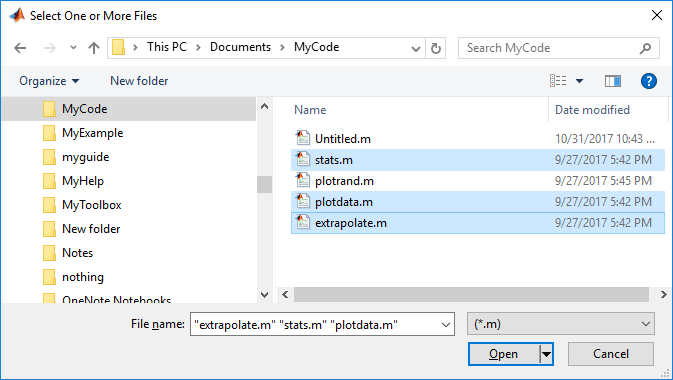
filename = uigetfile displays a modal dialog box that lists files in the current folder and enables you to select or enter the name of a file. If the file name is valid and the file exists, uigetfile returns the file name as a string when you click Open. Otherwise uigetfile displays an appropriate error message, after which control returns to the dialog box. You can then enter another file name or click Cancel. If you click Cancel or close the dialog window, uigetfile returns 0.



function userDraw(handles)
%F=figure;
%setptr(F,'eraser'); %a custom cursor just for fun

A=handles.axesUserDraw; % axesUserDraw is tag of my axes
set(A,'buttondownfcn',@start_pencil)

function start_pencil(src,eventdata)
coords=get(src,'currentpoint'); %since this is the axes callback, src=gca
x=coords(1,1,1);
y=coords(1,2,1);

r=line(x, y, 'color', [0 .5 1], 'LineWidth', 2, 'hittest', 'off'); %turning     hittset off allows you to draw new lines that start on top of an existing line.
set(gcf,'windowbuttonmotionfcn',{@continue_pencil,r})
set(gcf,'windowbuttonupfcn',@done_pencil)

function continue_pencil(src,eventdata,r)
%Note: src is now the figure handle, not the axes, so we need to use gca.
coords=get(gca,'currentpoint'); %this updates every time i move the mouse
x=coords(1,1,1);
y=coords(1,2,1);
%get the line's existing coordinates and append the new ones.
lastx=get(r,'xdata');
lasty=get(r,'ydata');
newx=[lastx x];
newy=[lasty y];
set(r,'xdata',newx,'ydata',newy);

function done_pencil(src,evendata)
%all this funciton does is turn the motion function off
set(gcf,'windowbuttonmotionfcn','')
set(gcf,'windowbuttonupfcn','')
참고 : http://we15hang.blogspot.ca/2012/04/matlab-gui-interactive-drawing.html
