Examples
The following statement displays a dialog box for retrieving a file. The dialog box lists all MATLAB code files within a selected directory.uigetfile returns the name and path of the selected file in FileName and PathName. uigetfile appends All Files(*.*) to the file types when FilterSpec is a string.
[FileName,PathName] = uigetfile('*.m','Select the MATLAB code file');
The following figure shows the dialog box with the file type drop-down list open.

To create a list of file types that appears in the file type drop-down list, separate the file extensions with semicolons, as in the following code. uigetfile displays a default description for each known file type, such as "Model files" for Simulink® .slx and .mdl files.
[filename, pathname] = ...
     uigetfile({'*.m';'*.slx';'*.mat';'*.*'},'File Selector');

If you want to create a list of file types and give them descriptions that are different from the defaults, use a cell array, as in the following code. This example also associates multiple file types with the 'MATLAB Files' and 'Models' descriptions.
[filename, pathname] = uigetfile( ...
{'*.m;*.fig;*.mat;*.slx;*.mdl','MATLAB Files (*.m,*.fig,*.mat,*.slx,*.mdl)';
   '*.m',  'Code files (*.m)'; ...
   '*.fig','Figures (*.fig)'; ...
   '*.mat','MAT-files (*.mat)'; ...
   '*.mdl;*.slx','Models (*.slx, *.mdl)'; ...
   '*.*',  'All Files (*.*)'}, ...
   'Pick a file');
The first column of the cell array contains the file extensions, while the second contains your descriptions of the file types. In this example, the first entry of column one contains several extensions, separated by semicolons, which are all associated with the description 'MATLAB Files (*.m,*.fig,*.mat,*.mdl)'. The code produces the dialog box shown in the following figure.

The following code lets you select a file and then displays a message in the Command Window that summarizes the result.
[filename, pathname] = uigetfile('*.m', 'Select a MATLAB code file');
if isequal(filename,0)
   disp('User selected Cancel')
else
   disp(['User selected ', fullfile(pathname, filename)])
end
This code creates a list of file types and gives them descriptions that are different from the defaults. It also enables multiple-file selection. Select multiple files by holding down the Shift or Ctrl key and clicking on additional file names.
[filename, pathname, filterindex] = uigetfile( ...
{  '*.mat','MAT-files (*.mat)'; ...
   '*.slx;*.mdl','Models (*.slx, *.mdl)'; ...
   '*.*',  'All Files (*.*)'}, ...
   'Pick a file', ...
   'MultiSelect', 'on');
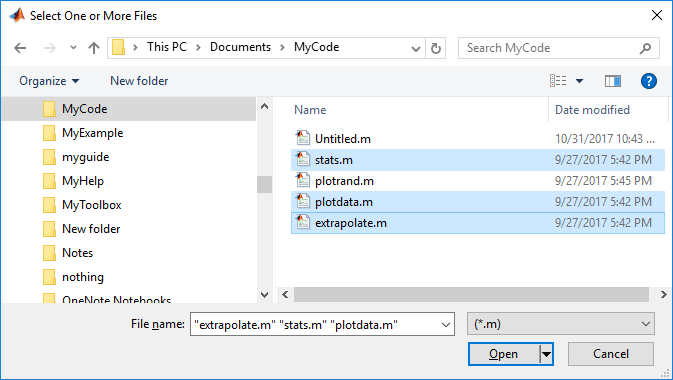
As mentioned previously, uigetfile does not open the file or files you select.
You can use the DefaultName argument to specify a start path and a default file name for the dialog box.
uigetfile({'*.jpg;*.tif;*.png;*.gif','All Image Files';...
          '*.*','All Files' },'mytitle',...
          'C:\myfiles\my_examples\gbtools\setpos1.png')



